
On This Page
 How to Start a Genesis with a Dead Key Fob
 How to Start a Genesis with a Dead Key Fob
Starting Your Genesis
- First, if you’re still locked outside, click here for help getting in!
- Second, you can find video help here!
- Finally, if you need or want another manufacturer, click here.
Genesis now uses a number of different ways to start the vehicle if the Smart Key is weak or the Smart Key does not work correctly.
All years, all models except 2021-4 G80
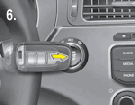 When the company first broken from Hyundai as a stand alone entity, all Genesis models used the simplest of all emergency start options: simply press the Start / Stop ignition button with the Smart Key while depressing the brake to start the vehicle.
Try it first and if if this does not work in your model, continue on below for a method that will.
2021-2014 G80
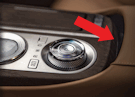 If your 2021 through 2024 G80 does not recognize the key fob or Smart Key, slip the Smart Key into the space behind the shifter dial and cup holders and in front of the leather of the console (right).
Then, step on the brake and push the Start / Stop ignition button to start the vehicle as normal.
Note that in 2025, the emergency start process reverts back to the previous method.
Digital back-up
 In addition, any model that can accommodate a digital key on a smart phone or has a pre-registered card key can use those items for an emergency start as well. The smart phone or card key can be placed on the vehicle’s wireless charging pad. It is found in front of the center console storage area (right).
Once in place, the vehicle can be started as normal.
- If you need emergency start help with Hyundai models, click this link.
- If you are looking for emergency start help with Kia models, click this link.
Video Help
Click here for videos to walk you through the processes.
Models examined include GV60, GV60, G70, GV70, G80, G80-EV, GV80 and G90. Model years 2017, 2018, 2019, 2020, 2021, 2022, 2023, 2024, 2025 and 2026.
… Return to Part I, Getting In
——————————————————————-
The information on this website is provided for information sharing purposes only, and should not be used in lieu of an OEM service manual or factory authorized service procedure. We are not in the auto repair business nor do we publish automotive service manuals. Nothing we include on these pages and posts has been reviewed, approved or authorized by any vehicle manufacturer.
Remember that only proper service and repair procedures will ensure the safe and reliable operation of your car. In addition, proper safety procedures and precautions, such as the use of safety goggles, the right tools and the equipment should be followed at all times to eliminate the possibility of personal injury or improper service which could damage the vehicle or compromise its safety.
Technology is always changing and what is current and accurate today may be literally out-of-date and inaccurate tomorrow. And when it comes to the current state of flux in the auto industry, nothing is more true.

The author has 30+ years of automotive experience and has assembled the most extensive collection of symbols and warning lights anywhere (over 1,000!) and can help you open and start any keyless start car with a dead key fob battery. BA, St. Joseph’s, ME: MS, RPI, NY